15 Sept 2025
How we cut $50k/year off our AWS bill with EKS Auto Mode and Karpenter
Before I joined the company, our EKS clusters did not scale at all. They ran on managed node groups with no cluster scaling, and each group had the same desired, minimum and maximum instance count. I moved the clusters to dynamic node scaling with EKS Auto Mode. The result was about $50k/year in AWS compute savings, with zero service disruption.
The problem with fixed node groups
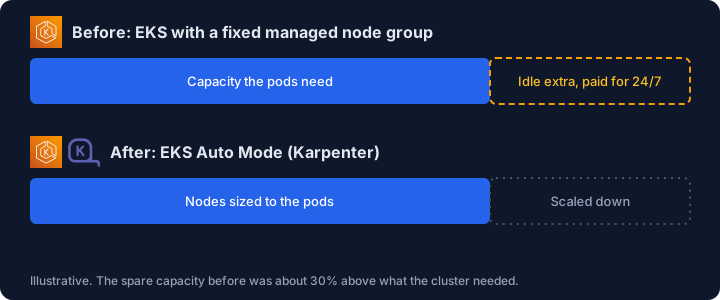
We ran four EKS clusters, one for each environment. All of them used managed node groups with a fixed instance count: the desired, minimum and maximum were all the same, and nothing scaled the cluster up or down. We sized them roughly 30% above what the cluster actually needed, so that there would always be room when pods had to scale. This had a few consequences:
- The cluster sat idle most of the time, in every environment, and production was the worst case.
- We paid for that extra 30% around the clock, and with four clusters the cloud costs were huge.
Starting with an investigation
Before committing to anything, we ran an investigation to find out whether migrating to EKS Auto Mode was even possible for us. EKS Auto Mode runs Karpenter for you, so nodes are created only when pods need them.
The main blocker was our load balancers. We were using Classic Load Balancers, which operate at layer 4, and EKS Auto Mode works with Application Load Balancers, which operate at layer 7. That is not a like-for-like swap, so the real question was how to get from one to the other.
At first we tried to keep the Classic Load Balancers. Auto Mode was new at the time, and when we talked to AWS support, they told us it was possible. It was not. We had to find that out ourselves, and the only way forward was to migrate to ALBs.
To work out how, we built a proof of concept: a separate EKS cluster, set up with an ALB and a set of application workloads, to act as a migration cluster. We ran end-to-end tests against it to make sure everything worked behind the ALB. The result was clear. Migrating everything to ALBs was perfectly feasible, with no loss for our company workloads, and the proof of concept gave us every step we needed to do it.
Building the new clusters
ALBs from Auto Mode
EKS Auto Mode runs the AWS load balancer controller for you. To make it provision our ALBs automatically, we added
an IngressClass and IngressClassParams to the cluster
(docs). After that, every Ingress that uses this class gets
its own ALB in AWS, with no manual setup.
Provisioning with Terraform
We wrote a new Terraform module that provisions EKS Auto Mode, so every environment gets its cluster from the same code.
Node pools and scaling
Once the investigation showed the migration was feasible, we moved the workloads to dynamic scaling. A few notes from the migration:
- Split workloads with your own
NodePoolandNodeClass. We separated workloads by type and used anodeSelectorto place each one on the right instances. Data workloads need more memory, so they run on memory-optimizedr8iinstances. Application workloads run onm8i, which are more well-rounded. - Let consolidation do its job. Auto Mode packs workloads together and removes nodes that are underused, so there is nothing extra to switch on.
- Set
NodePoollimits. We set ours to 100% more than the cluster normally uses, based on its usage patterns. That leaves room to grow, but one misbehaving deployment cannot scale up a large number of expensive instances. - Use Spot for workloads that are not critical. We created Spot nodes for these workloads and assigned their pods to them. They tolerate interruptions fine. Critical workloads stay on On-Demand.
- Set disruption budgets on your
NodePool. We configured them so that nodes only rotate outside of spike hours, during the US night. This keeps node rotation away from peak traffic. - Check your pod disruption budgets. Consolidation will happily evict pods to pack things more efficiently, so make sure your PDBs reflect what you can really tolerate.
Migrating with blue/green
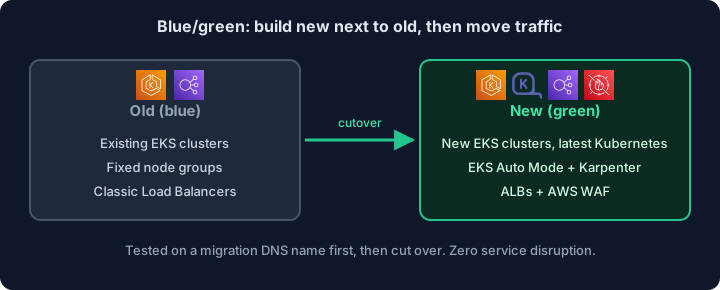
We never modified the existing clusters. Instead, we built new EKS clusters alongside them and moved over using a blue/green approach. This also let us upgrade Kubernetes from 1.27 to 1.29 along the way.
While the new clusters were being built, we used a separate migration DNS name to test everything on them temporarily, without touching live traffic. Once we were happy with the results, we did the cutover. Each migration took two days at most, so the old and new clusters only ran side by side for a short time.
Rolling back was easy: we could simply go back to the old cluster. Our databases live outside the cluster. The ELK stack did run inside it, but our backups are automated, so restoring them into a new StatefulSet on the new cluster was simple.
The outcome
Because we had four clusters, one per environment, the cost of idle capacity added up fast. Moving all of them to Auto Mode saved about $50k/year in AWS compute, and there was no service disruption during the migration. The platform also improved in other ways:
- Efficiency. Our systems scale whenever they need to, and nodes match the workloads running on them.
- Load balancing. We finally retired the Classic Load Balancers and moved to ALBs.
- Security. With ALBs in place, we added AWS WAF to restrict access to our systems, reduce bot traffic and block high-risk countries.
The main lesson: do not take it for granted that something will work, even when the vendor says it will. We only learned that keeping Classic Load Balancers was not possible by building a proof of concept and testing it.